Lesson reading
live
40 min
Start with the lesson question, connect the representations, and test the model with evidence.
Inspect the opening phenomenon
Predict what changes, then name the evidence.
Apply in the lab
Name the evidence before reading the answer.
Read only what helps
Then use the lab and recall check.
More when needed
Transcript and resources stay available below.
Course progress
Robot Anatomy, Power, and Compute
Decision challenge
Use the opening example to make a prediction, identify evidence, and explain which model supports it.
Predict two budgets affected when a second camera is added.
A faster AI model can make a robot worse when it exhausts the physical system's shared resource budgets.
Before
Predict two budgets affected when a second camera is added.
During
Track one change through at least three connected subsystems.
After
Explain why average compute speed cannot prove safe control timing.
Lesson reading
live
40 min
Video script
draft
Transcript fallback
available
courses/ai-robotics/modules/02-robot-bodies-sensors-actuators-compute/lessons/01-robot-anatomy-power-and-compute/video-transcript.md
Robot Resource Budget Lab
draft
30 min
Mastery check
live
6 questions / 10 min
# Video Transcript — The Robot Resource Budget A faster AI model can make a robot worse. How? Because every upgrade spends from the same physical budget. A robot is six connected systems: structure, power, sensors, compute, communication, and actuators. None works alone. Add a camera and you add mass, electrical load, data, computation, and heat. More battery may add runtime—but also mass and motor effort. Average speed is not enough. If sensing, networking, inference, or control misses the deadline, the robot acts on stale evidence. Quick check: name the five shared budgets. Mass, power, heat, compute, and time. Build the full resource-budget lab in the free EduQuest AI Robotics course.
Reading lab
Connect the lesson's words, diagrams, graphs, evidence, and equations.
Opening challenge: A rover's object detector becomes twice as fast—but the battery now sags, the computer throttles, and the motors miss a control deadline. Did the robot improve?
Not necessarily. A robot is a physical system with shared limits. Better software helps only when the whole machine can supply the mass, electrical power, cooling, computation, communication, and time that the software requires.
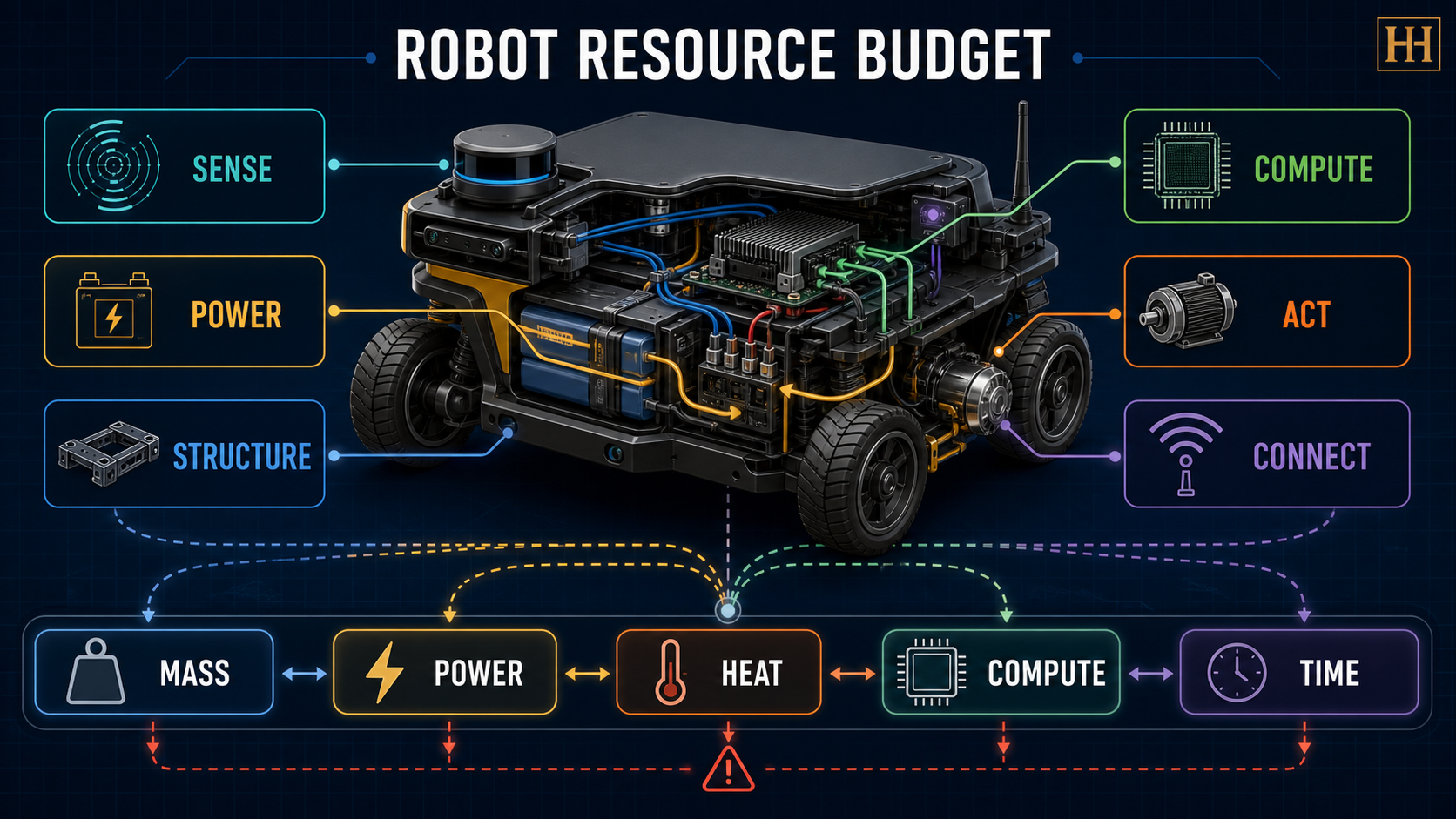
| Subsystem | Job | Evidence it produces or consumes | Typical failure clue |
|---|---|---|---|
| Structure and mechanics | Carry loads, maintain geometry, transmit forces | mass, dimensions, clearance, payload, friction | bending, slipping, tipping, blocked motion |
| Power | Store, convert, protect, and distribute energy | voltage, current, state of charge, temperature | brownout, shutdown, short runtime |
| Sensors | Turn physical phenomena into measurements | images, ranges, joint positions, current, temperature | noisy, stale, saturated, or missing data |
| Compute | Estimate state, plan, communicate, and control | CPU/GPU load, memory, latency, deadlines | dropped frames, late commands, thermal throttling |
| Actuators and drivers | Convert electrical commands into force or motion | torque, speed, current, position | stall, overheating, weak or delayed movement |
| Communication | Move data and commands among components | bandwidth, delay, packet loss, timestamps | stale state, incompatible rates, silent components |
The arrows matter more than the boxes. Sensors require power and bandwidth. Compute produces heat. Actuators can draw large current. Added batteries and payload increase mass, which can raise required motor effort. A robot architecture is therefore a network of coupled budgets.
Every component must be carried and physically fit. Payload changes acceleration, stopping distance, traction, stability, and energy use. Mounting location also matters: a heavy device high above the ground can make a rover easier to tip.
Clearpath's official Jackal manual makes this concrete. It lists a maximum payload of 20 kg, a 270 Wh lithium battery, user-power limits, and different runtimes for basic and heavy use. Those numbers are product-specific, but the engineering lesson generalizes: payload, electrical loads, and duty cycle cannot be chosen independently.
Energy answers “how long?” Power answers “how fast is energy being used now?”
runtime ≈ usable energy ÷ average power.Suppose a robot has 240 Wh of usable battery energy and averages 60 W:
240 Wh ÷ 60 W = 4 h
That is only a planning estimate. Motor starts, slopes, cold batteries, conversion losses, aging, and safety reserves reduce usable runtime. A system can also fail even with energy remaining if a short current surge drops voltage below the computer's operating limit. NVIDIA's Jetson Nano guide, for example, states that its board shuts down if supply voltage falls below its documented threshold; it also provides distinct 5 W and 10 W compute modes. More compute performance therefore has an electrical cost.
Most consumed electrical power eventually becomes heat. When heat cannot leave quickly enough, processors may reduce clock speed, motor drivers may protect themselves, and batteries may move outside their allowed temperature range. Thermal design—heatsinks, airflow, conduction paths, enclosure design, and operating temperature—is part of robot behavior, not cosmetic packaging.
NVIDIA's official Jetson guidance explicitly links power modes, device temperature, and thermal throttling. A model that meets its frame-rate target on a cool desk may miss deadlines inside a sealed rover after twenty minutes.
“Can this computer run the model?” is incomplete. Ask:
Average speed can hide dangerous pauses. ROS 2's real-time guidance frames correctness around update deadlines and bounded jitter: a controller that is occasionally very late may fail even if its average computation time looks good.
A measurement has an age. A command has a deadline. A network has finite bandwidth. ROS 2 Quality of Service distinguishes concepts such as deadline, lifespan, reliability, and liveliness because a delivered message can still be too late to use.
For a moving robot, the evidence chain is:
capture → transmit → estimate → decide → command → actuator response
End-to-end latency is the sum of these stages. Reducing only model inference time may not fix a slow camera, congested bus, or sluggish actuator.
A warehouse rover currently averages 45 W and has 180 Wh usable energy. Its mission requires 3 hours.
180 ÷ 45 = 4 h.180 ÷ 60 = 3 h.The correct question is not “Is a second camera better?” It is “Does the added evidence improve mission performance enough to justify its effects on every relevant budget?” Possible revisions include lowering frame rate, processing only when needed, choosing a lower-power sensor, adding battery capacity while rechecking mass, or redefining the mission.
“A faster AI computer always makes the robot smarter.” A faster processor may consume more power or throttle when hot. Intelligence is useful only when decisions arrive within the system's physical deadlines.
“Battery capacity determines everything.” Capacity estimates duration; peak current, voltage regulation, wiring, fusing, and conversion losses determine whether components remain powered during demanding moments.
“Payload is just a weight limit.” Payload location and motion affect stability, traction, stopping, energy, and structural stress.
“The simulator ran, so hardware will run.” Simulation often omits supply sag, thermal throttling, electromagnetic interference, network contention, wear, and uncertain friction.
Without looking back, name the six subsystems and five shared budgets. Then answer:
A robot is not software attached to wheels. It is a coupled physical system. Structure carries loads, power supplies energy, sensors create measurements, compute transforms evidence into decisions, communication moves information, and actuators create motion. Every design choice spends from shared mass, power, heat, compute, and time budgets. World-class robot engineering makes those budgets visible, measures them under realistic workloads, and defines safe behavior when a limit is reached.
Build and stress-test a resource budget for a simulated warehouse rover. No hardware or paid software is required.
Use paper or a spreadsheet with columns: component, job, mass, average power, peak power, data rate, compute load, heat concern, deadline, and fallback. The numbers below are fictional training values, not product specifications.
The rover has 240 Wh usable battery energy, a 25 kg total-mass limit, and a 3-hour mission.
| Load | Mass | Average power | Peak power |
|---|---|---|---|
| Base, motors, and drivers | 15 kg | 38 W | 140 W |
| Computer | 1 kg | 12 W | 20 W |
| Safety lidar | 1 kg | 8 W | 10 W |
| Camera | 0.3 kg | 4 W | 6 W |
| Payload | 5 kg | 0 W | 0 W |
Your submission should show calculations, assumptions, one rejected configuration, one accepted revision, a fault-response table, and a timing chain. A strong answer explains trade-offs rather than merely staying below totals.
Add a third sensor or a higher-performance compute mode. State the mission benefit you expect, trace the change through at least three shared budgets, and propose a measurable acceptance test plus a safe fallback if any limit is exceeded.
The lab is fully text-based. A screen-reader-friendly table is sufficient; no diagram or simulator is required. Do not open batteries, bypass fuses, alter power wiring, or run motors on a lifted or unsecured robot.