Lesson reading
live
40 min
Start with the lesson question, connect the representations, and test the model with evidence.
Inspect the opening phenomenon
Predict what changes, then name the evidence.
Apply in the lab
Name the evidence before reading the answer.
Read only what helps
Then use the lab and recall check.
More when needed
Transcript and resources stay available below.
Course progress
Open- and Closed-Loop Control
Decision challenge
Use the opening example to make a prediction, identify evidence, and explain which model supports it.
Predict why the same timed command stops differently on tile and carpet.
Open-loop control acts without outcome feedback; closed-loop control measures error and corrects what it can observe and influence.
Before
Predict why the same timed command stops differently on tile and carpet.
During
Trace setpoint, measurement, error, command, and feedback.
After
Name one failure feedback cannot correct.
Lesson reading
live
40 min
Video script
draft
Transcript fallback
available
courses/ai-robotics/modules/05-feedback-and-control/lessons/01-open-and-closed-loop-control/video-transcript.md
Compare Two Robot Stopping Controllers
draft
25 min
Mastery check
live
7 questions / 10 min
# Video transcript The same two-second drive command stops at different places on tile and carpet. Open loop sends a preset command without measuring final position, so a disturbance survives as error. Closed loop sets a target, measures position, and computes error as setpoint minus measurement. The controller updates its command, the robot moves, and the sensor closes the loop. Repeat until error and motion are within tolerance. Feedback corrects observed error—not every failure. Sensor bias, delay, actuator limits, and unobserved hazards can still defeat the system. If the sensor says 0.82 metres and the target is 1.00 metre, the signed error is plus 0.18 metre.
Reading lab
Connect the lesson's words, diagrams, graphs, evidence, and equations.
A small robot is told to drive for two seconds and stop at a green line. On a smooth floor it nearly succeeds. On carpet it stops short; after a gentle push it travels sideways. The command did not change, but the world did.
Predict: What information would let the robot correct while it is still moving?
In the previous module, you learned to observe, record, and replay robot evidence. This lesson turns that evidence path into an action path: a controller uses a current measurement—not merely a log saved for later—to revise what the robot does next.
Follow this three-lesson progression:
You do not need calculus or ROS 2 code here. Keep asking one question: does the measured outcome change the current command?
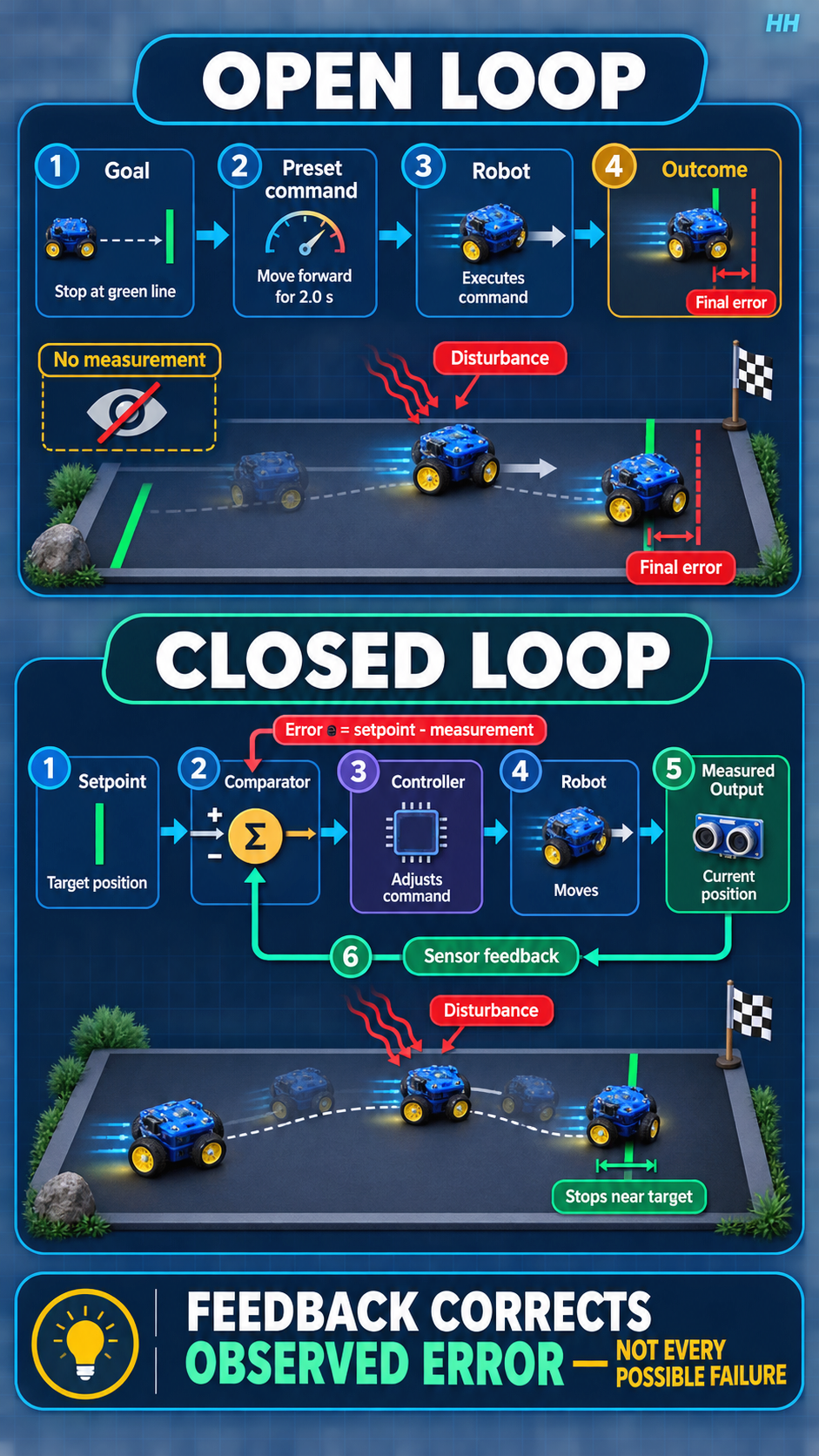
An open-loop controller sends an action without using a measurement of the controlled outcome to revise that action. A timer-driven motor command is open loop with respect to final position.
A closed-loop controller measures an output, compares it with a desired value, and uses the difference to update its command. The loop repeats while the task runs.
| Element | Question | Robot example |
|---|---|---|
| Setpoint | What do we want? | stop at position 1.00 m |
| Measurement | What do we observe? | encoder estimate 0.82 m |
| Error | How far and in which direction? | e = 1.00 - 0.82 = +0.18 m |
| Controller | What command follows from that error? | keep driving forward |
| Plant | What physical system responds? | motors, wheels, chassis, floor |
| Feedback | What measurement returns? | updated position estimate |
The sign matters. If the measurement is 1.07 m, then e = 1.00 - 1.07 = -0.07 m; the robot has passed the target.
Open-loop attempt:
Closed-loop attempt:
error = target - measurement.Feedback can reject some disturbances and model errors because their effects appear in the measurement. It cannot correct a failure that is not observed, arrives too late, saturates the actuator, or makes the measurement misleading.
Open loop can be appropriate when the environment is predictable, the action is brief, variation is harmless, measurement is unavailable, or a trusted lower-level controller already closes the relevant loop. A camera exposure pulse and a prevalidated gripper release may be open loop at one layer while motor current is closed loop underneath.
A feedback loop depends on its sensor, estimator, timing, controller, actuator limits, and physical plant. Noise can make the command chatter. Delay can make correction arrive late. Excessive gain can cause overshoot or oscillation. A biased sensor can drive the robot confidently toward the wrong value.
Control structure is a claim about information flow—not a guarantee of accuracy or safety.
For each task, identify the controlled variable, setpoint, measurement, disturbance, and one unobserved failure:
Compare preset-time and measurement-feedback stopping using a hardware-free table simulation.
lab-worksheet.csve = 1.00 - position, and move by min(0.25, max(-0.25, 0.5e)) metres.The downloadable CSV provides four trials and these columns: trial, step, start position, setpoint, measurement, signed error, unclamped command, applied command, disturbance, end position, and tolerance result. Keep metres in every position/error/command field. For the feedback trials, calculate signed_error_m = setpoint_m - measurement_m, then clamp 0.5 × signed_error_m to the interval [−0.25 m, +0.25 m]. Apply the listed disturbance once during that row.
The preset sequence changes little when error changes. The feedback sequence updates commands after observed disturbances, but sensor bias reveals that feedback cannot correct what it measures incorrectly.
Use the tolerance column to record yes only when abs(setpoint_m - end_position_m) ≤ 0.03 m. The nominal feedback trial should require multiple shrinking corrections rather than one full command, which makes the information loop visible in the table.
Design a combined feedforward-feedback command and explain what each term contributes.